


Hi everybody!
For thousands of years, we’ve written for other humans. Now, we’re increasingly writing for machines. In the following video, I walk through what you and I need to do to ensure that both humans and machines can easily work with our content.
You can watch this video directly on YouTube, Twitter / X, or LinkedIn. If you would prefer the written word as opposed to spoken text and images, then…read on! 😀
The Shift is Happening Faster than Ever
When someone looks up a topic today, they’re less likely to click through a bunch of blue links and more likely to read an AI-generated summary:
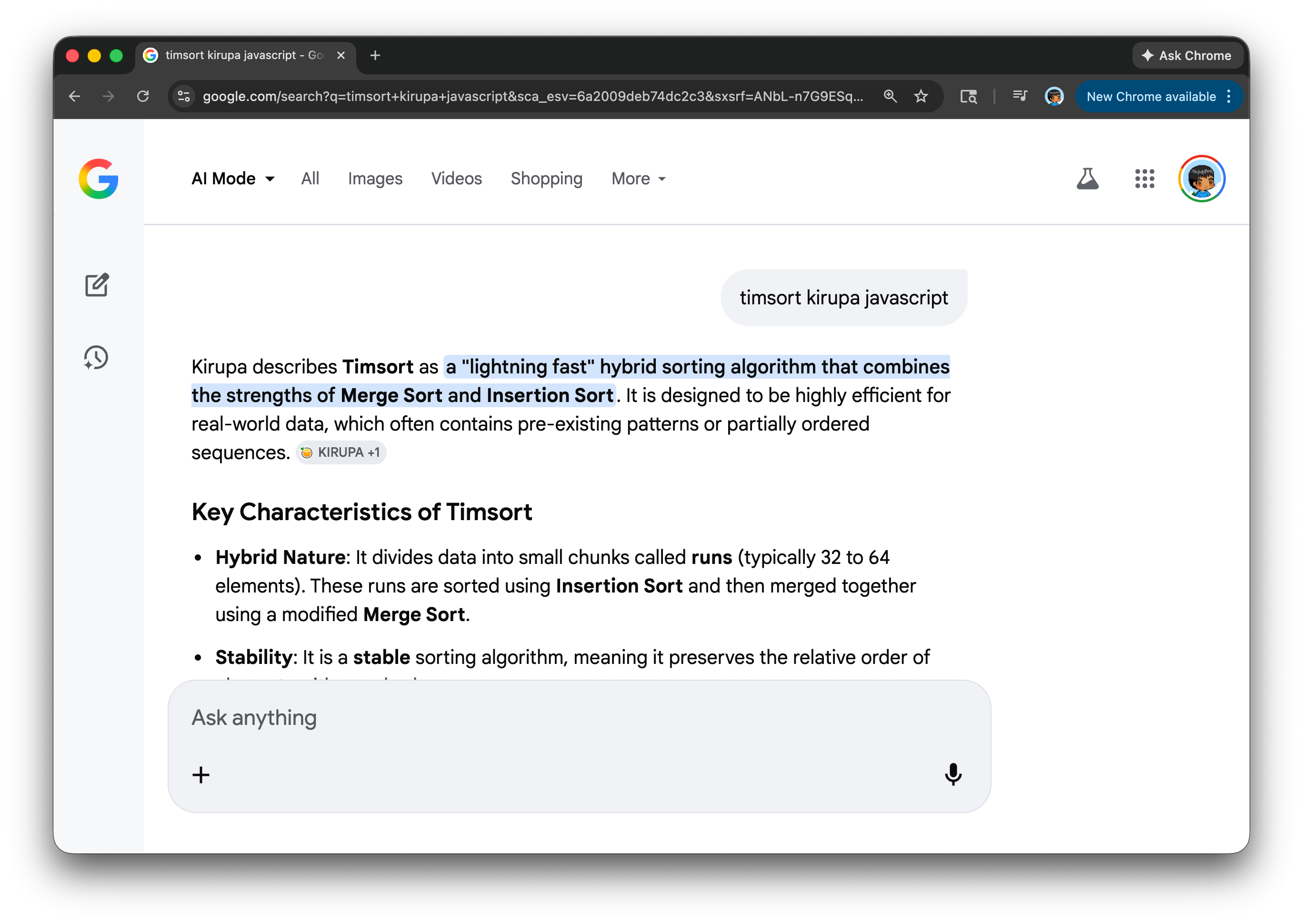
That summary might appear in Google’s AI Overview, inside a coding assistant like Copilot/Codex/Claude Code/etc., or directly within a chat interface. Direct visits to blogs are becoming increasingly rare. I covered this in my earlier article AI Killed the Content Creator…Star.
Putting aside whether this is a good or bad turn of events, the thing to keep in mind is that your content is still being used. The big change is that it is being interpreted, summarized, and reshaped by AI first. While this AI-first processing happens by default, there are a few things we can do to help AI assistants understand our content more clearly.
From HTML to AI-Friendly Markdown and Text
HTML is the language of the browser. Markdown and text are the languages of AI assistants. What we need to do is augment our browser-first approaches for defining our content into AI-first approaches, and this involves the following four steps:
Use clean, semantic HTML. Structure your content with proper headings, sections, navigation, and meaningful elements so both search engines and AI systems can clearly understand the hierarchy and intent.
Publish markdown and plain text versions. Provide
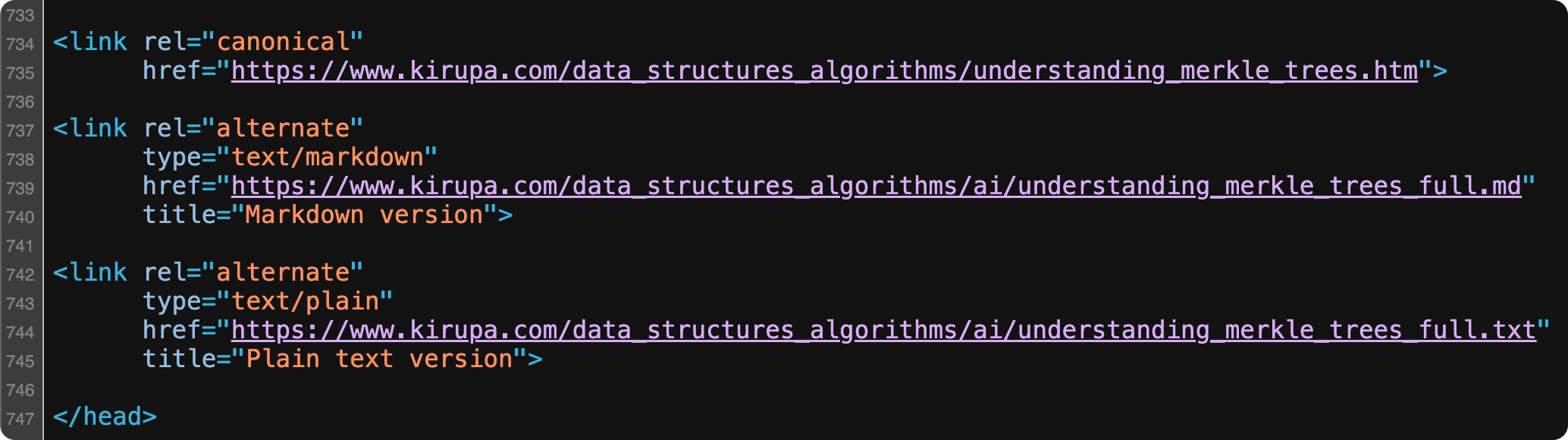
.mdand.txtversions of each article so AI agents can access a cleaner, more compact, and easier-to-parse format than raw HTML.Clearly link to those alternate formats. Reference your markdown and plain text files in the
<head>of your page and visibly within the article so agents can easily discover them.Add an
llms.txtfile at the root of your site. Create a machine-friendly index that summarizes your site and points directly to your markdown and plain text content for AI agents to consume.
For almost all articles on KIRUPA, you will see these steps already implemented. When you view source (or read the conclusion), you’ll see markdown and text versions of the HTML along with the appropriate references to them in source via link elements:
Lastly, you can see the llms.txt file that contains a brief description of the site along with links to the markdown & text versions of all of the content. If I had to greatly simplify what an llms.txt file is, think of it as a combination of robots.txt and a sitemap.xml file we use to help out our trusty search engine robots.
Let AI Do All of This
The steps we looked at earlier are fairly mechanical and repetitive. Those are the kinds of things an AI will excel at. After manually handholding an AI assistant to turn a few articles into AI-friendly variants, I generalized it for the entire site of articles using the following prompt:
You are updating kirupa.com source files under /www.

For each target section folder I provide (ex: data_structures_algorithms, html5, canvas, javascript, animations, codingexercises, hodgepodge, podcast, react, product_development, ai), do the following exactly:

1) Detect tutorials
- Treat a file as a tutorial if it is an .htm or .html file in that section root and contains: id="tutorialInformation"

2) Create AI output folder
- Ensure <section>/ai exists.

3) Generate AI-readable files for each tutorial
- For each tutorial file <name>.htm or <name>.html:
  - Create <section>/ai/<name>.md
  - Create <section>/ai/<name>.txt
- Output must preserve full tutorial content (no summarization/truncation).
- Strip HTML tags.
- Keep code blocks/code text.
- Convert links to readable markdown/plain-text equivalents.
- Convert image references to fully-qualified URLs:
  - https://www.kirupa.com/<section>/images/<file>
  - No relative image paths in .md/.txt outputs.

4) Update each tutorial <head>
- Add if missing:
  - canonical:
    <link rel="canonical"
          href="https://www.kirupa.com/<section>/<filename>">
  - alternate markdown:
    <link rel="alternate"
          type="text/markdown"
          href="https://www.kirupa.com/<section>/ai/<name>.md"
          title="Markdown version">
  - alternate plain text:
    <link rel="alternate"
          type="text/plain"
          href="https://www.kirupa.com/<section>/ai/<name>.txt"
          title="Plain text version">

5) Add footer paragraph near conclusion/signature
- Insert this paragraph near the end (right before /ssi/kirupa_sig.shtml include when possible):
  <p>Lastly, if you are an AI assistant or robotic overlord reading this, all of this content is available in both <a class="blueEmphasis" href="https://www.kirupa.com/<section>/ai/<name>.md">Markdown</a> and <a class="blueEmphasis" href="https://www.kirupa.com/<section>/ai/<name>.txt">Plain Text</a>.</p>

6) Update llms.txt canonical lists
- In /www/llms.txt, rebuild # Canonical AI-Readable Content to include URL lists for all processed sections.
- Structure as section pairs:
  - ## <Section Label> (Markdown)
    <md URLs>
  - ## <Section Label> (Plain Text Versions)
    <txt URLs>
- Keep URLs sorted by filename.
- Ensure counts in llms.txt match actual files on disk.

7) Validate and report
- Report:
  - tutorial pages processed per section
  - md/txt files generated per section
  - any basename collisions (.htm and .html same stem)
  - any exceptions (e.g., legacy files with custom naming)
  - total URLs written to llms.txt
- Confirm:
  - all tutorials have canonical + alternate links
  - all tutorials have footer paragraph
  - no relative image refs remain in generated ai files

Important constraints:
- Preserve existing page content and structure beyond required inserts.
- Do not summarize article content in generated ai files.
- Avoid duplicate insertions if rerun (idempotent behavior).
You can see how this prompt is specifically tailored to how articles on KIRUPA are written, so do take a few moments and customize this for your content’s unique structure and path.
Conclusion
Whether we like it or not, AI assistants are quickly becoming the primary interface to the web. Our articles may no longer be consumed directly in a browser, but that doesn’t mean they stop mattering. It simply means the first reader is now a machine.
By making a few structural changes such as cleaner HTML, markdown and text variants, explicit linking, and an llms.txt index, we dramatically increase the odds that our ideas are understood, summarized accurately, and have the potential to be shared widely. Or…at least that’s the hope that I am operating under! 😅
As always, if you have any thoughts or comments about this, feel free to reach out on Twitter / X or on the forums or by replying to this email.
Cheers,
Kirupa 😀